
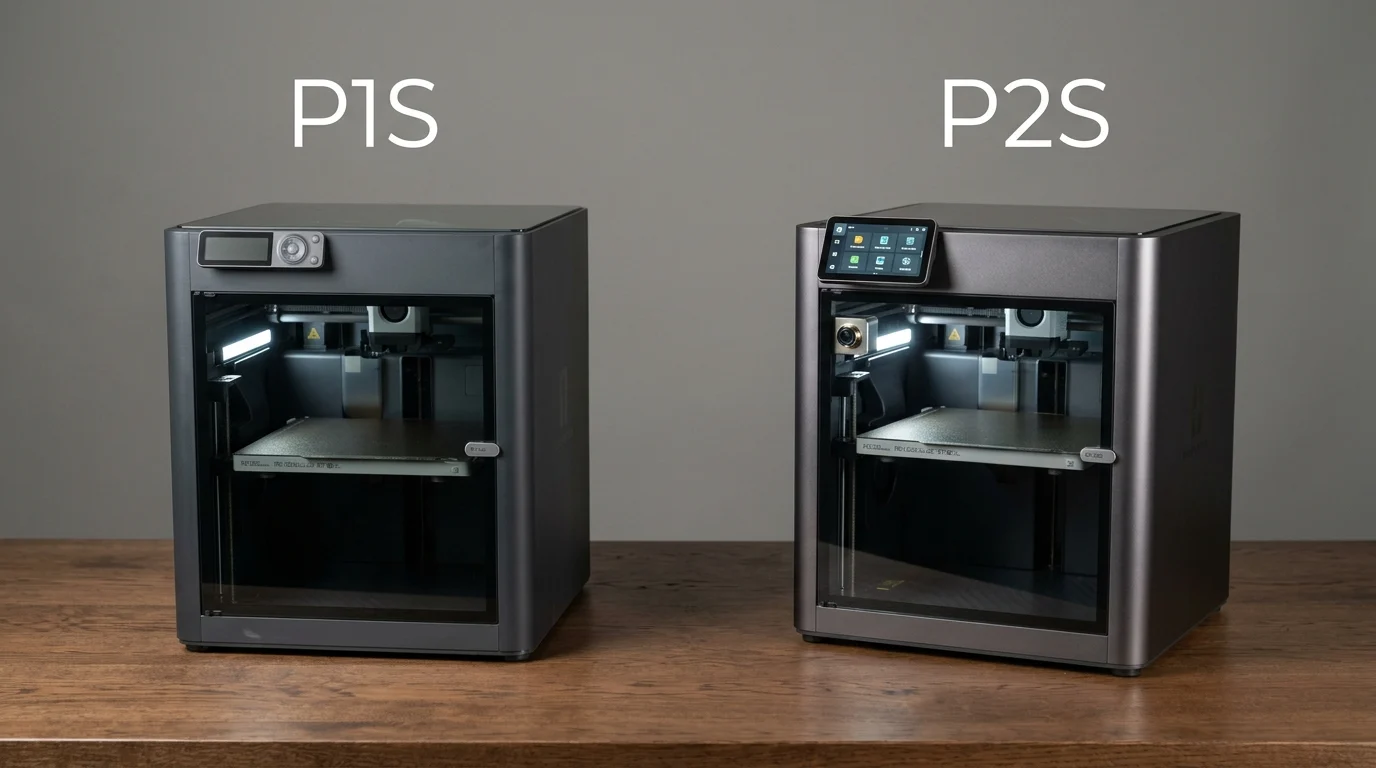
Quick Answer: The Bambu Lab P1S and P2S are enclosed 3D printers designed for fast, reliable printing. Both offer a 256 × 256 × 256 mm build volume and a maximum nozzle temperature of 300°C. However, the newer P2S adds a touchscreen, improved extrusion monitoring, a faster camera, a quick swap nozzle system, and enhanced airflow control. The P1S remains a capable option for budget conscious users.
Choosing between the Bambu Lab P1S and P2S can be challenging because both printers share a similar design and many core specifications. They are enclosed CoreXY machines built for users who want fast printing without dealing with complicated manual adjustments.
However, the P2S introduces several improvements that can make everyday printing more convenient. These include a larger touchscreen, improved camera monitoring, a redesigned extruder, and easier nozzle replacement. Meanwhile, the P1S remains attractive for users who want reliable performance without paying extra for newer features.
So, is the P2S worth the upgrade, or does the P1S still offer better value? The answer depends on your budget, the materials you print, and how much you value convenience and monitoring features.
This comparison explains the main differences, shared specifications, advantages, and limitations of both machines to help you choose the right 3D printer.
P1S vs P2S: Quick Answer
Choose the Bambu Lab P1S if you want an enclosed 3D printer for everyday projects and primarily use materials such as PLA and PETG. It offers a proven design and many essential features at a potentially lower price.
Choose the Bambu Lab P2S if you want newer hardware, a touchscreen interface, improved print monitoring, easier nozzle changes, and better support for abrasive fiber reinforced filaments with its supplied hardware.
Both printers have the same nominal build volume, so the P2S is not an upgrade for printing larger objects. Its main advantages involve usability, extrusion performance, and material handling.
Bambu Lab P1S vs P2S: Key Differences
| Feature | Bambu Lab P1S | Bambu Lab P2S |
|---|---|---|
| Printer design | Enclosed CoreXY | Enclosed CoreXY |
| Build volume | 256 × 256 × 256 mm | 256 × 256 × 256 mm |
| Maximum nozzle temperature | 300°C | 300°C |
| Maximum bed temperature | 100°C | 110°C |
| Maximum advertised toolhead speed | 500 mm/s | 600 mm/s |
| Display | 2.7 inch screen with buttons | 5 inch touchscreen |
| Camera | 720p, low frame rate | 1080p, up to 30 fps |
| Nozzle replacement | Conventional replacement process | Quick swap system |
| Extrusion monitoring | Standard system | Improved real time detection |
| Fiber reinforced filaments | Requires suitable upgraded components | Better supported with supplied components |
Specifications describe manufacturer rated capabilities. Actual printing speed and results depend on the model, filament, settings, and print conditions.
1. Printing Speed and Quality
Both printers are designed for high speed printing. The P1S has an advertised maximum toolhead speed of 500 mm/s, while the P2S reaches a rated maximum of 600 mm/s.
However, these figures do not mean every print will finish proportionally faster. The geometry of the model, layer height, filament flow, cooling, and slicer settings all affect print time.
The P2S has an updated extrusion system designed to improve material delivery and detect certain extrusion problems. These improvements can be useful during demanding prints.
Nevertheless, both machines can produce detailed, high quality results when configured correctly. Buying the P2S does not automatically guarantee a visibly better finish on every model.
2. Screen, Camera, and Ease of Use
One of the most noticeable differences is the control interface.
The P1S uses a smaller screen with physical buttons. It provides essential controls, but navigating settings may feel less convenient to users who prefer a modern touchscreen.
The P2S includes a 5 inch touchscreen and an updated interface. It also has a higher resolution camera with a much higher frame rate, making it easier to monitor prints remotely.
In addition, the P2S offers improved error detection and a quick swap nozzle system. These features can reduce interruptions and make routine maintenance more convenient.
For beginners and frequent users, these improvements may be more valuable than the maximum speed difference alone.
3. Filament Compatibility
Both printers can work with common materials such as PLA and PETG. They can also handle other materials when the appropriate settings and environmental conditions are used.
The P2S offers a hardened steel nozzle and extrusion components suited to abrasive fiber reinforced filaments, including certain carbon fiber filled materials. The standard P1S configuration is less suitable for these abrasive materials without compatible upgrades.
The P2S also has a higher maximum build plate temperature. This can help with materials that benefit from additional bed heat, although it does not mean the printer has an actively heated chamber.
If you mostly print everyday decorative objects, organizers, and basic prototypes, the P1S may be sufficient. For users interested in engineering materials, the P2S offers a more convenient starting point.
4. Multicolor Printing
Both printers support compatible Automatic Material System equipment for multicolor and multimaterial workflows.
The P1S can be paired with compatible AMS systems, while the P2S supports a newer setup that can include the AMS 2 Pro. The P2S Combo includes this system, while the standard printer package does not necessarily include it.
An AMS system can automatically manage multiple filament colors, but it adds cost and takes up workspace. If multicolor printing is important, compare the complete packages rather than the printer alone.
5. Price and Overall Value
The P1S is generally the more budget friendly choice when its current selling price is lower than the P2S. Its value is especially strong for people who do not need the newest interface or advanced monitoring features.
The P2S costs more in many markets, but its upgraded hardware may justify the difference for frequent printing, more demanding materials, and users who want a smoother workflow.
Prices and promotions change by region, so check the current price of each printer and its included accessories before making a decision.
Which Printer Should You Buy?
Choose the P1S if:
- You want to spend less on an enclosed printer.
- You mainly print PLA, PETG, and similar everyday materials.
- You value proven performance over newer convenience features.
- You do not need the upgraded screen or camera.
Choose the P2S if:
- You want a touchscreen and improved print monitoring.
- You frequently change nozzles or print demanding materials.
- You value improved extrusion monitoring and error detection.
- You plan to use compatible fiber reinforced filaments.
For many new buyers, the P2S is the more feature rich option. However, the P1S can be the smarter purchase when the price difference is substantial and its features already meet your needs.
Frequently Asked Questions
Is the P2S better than the P1S?
The P2S offers newer features and hardware improvements. However, the P1S remains capable and may provide better value for users who do not need those upgrades.
Does the P2S have a bigger build volume?
No. Both printers have a nominal build volume of 256 × 256 × 256 mm.
Is the P1S still worth buying?
Yes. It remains a practical choice for everyday printing, especially when available at a lower price.
Can the P1S print carbon fiber filament?
Some carbon fiber filled filaments may be printable after installing suitable hardened components. Check material compatibility and upgrade requirements before use.
Does the P2S print faster?
Its advertised maximum toolhead speed is higher, but real print times depend on the model, filament, and settings.
Should P1S owners upgrade to the P2S?
An upgrade makes the most sense if you need the improved interface, monitoring, extrusion features, or material compatibility. If your P1S meets your needs, replacing it may not be necessary.
Conclusion
The Bambu Lab P1S vs P2S comparison comes down to price, convenience, and the type of projects you plan to print. Both printers share the same build volume, enclosed design, and 300°C maximum nozzle temperature, making either suitable for many everyday 3D printing tasks.
The P1S is a strong choice for budget conscious users who want dependable performance without paying for the latest features. In contrast, the P2S offers a touchscreen, improved camera monitoring, a quick swap nozzle system, and a more advanced extrusion setup.
If you are buying your first printer and can comfortably afford the difference, the P2S provides a more modern experience. However, if your projects mainly involve common filaments and straightforward prints, the P1S can still deliver excellent value.
Before buying, compare current prices, package contents, material requirements, and local warranty support. The best printer is the one that matches your actual printing needs rather than simply having the newest specifications.